Room Temperature Thermometer
- 4.5
- Rating
- 5.00M
- Installs
- Free
- Price
 Analysis by App-foxy
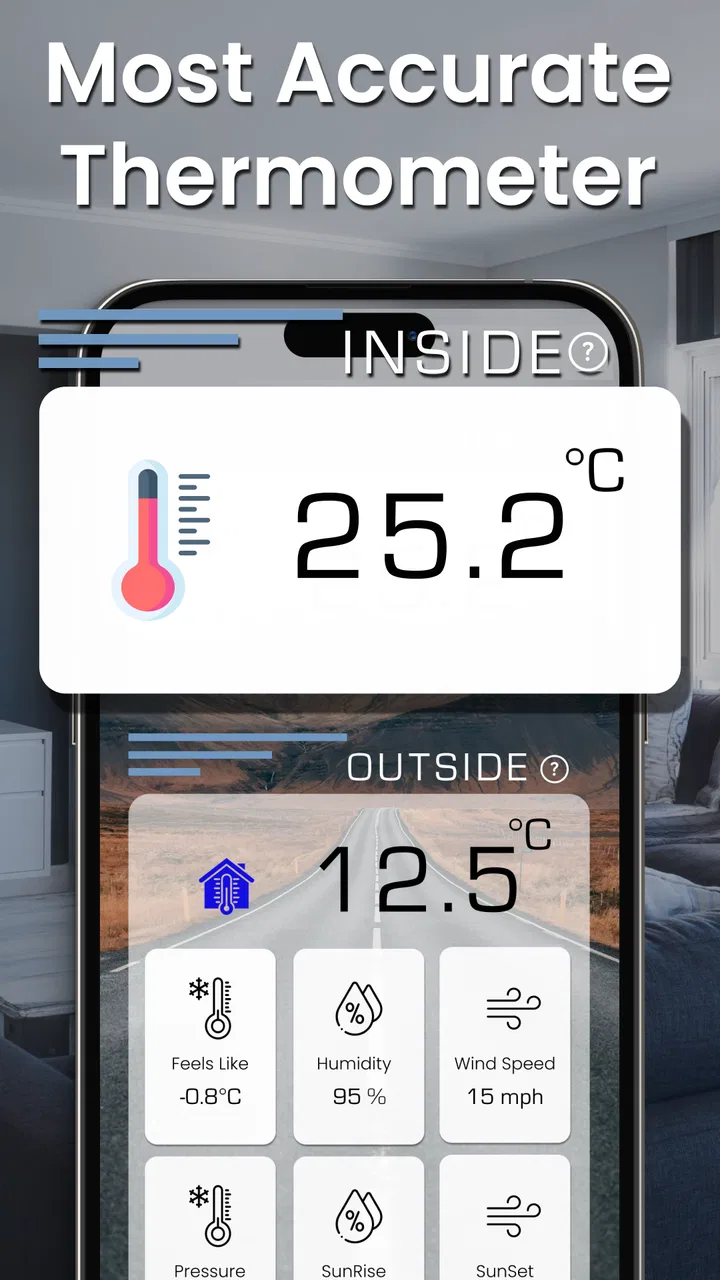
I installed Room Temperature Thermometer expecting a simple way to get a quick sense of the temperature around me, and that is exactly the kind of experience it aims to provide. This free weather app from APPVERSE is designed for checking indoor conditions, with a focus on room temperature and humidity rather than outdoor forecasts, radar maps, or storm alerts. That narrower purpose is important: it can be convenient when I want a fast reading at home, but it should not be treated as a replacement for a dedicated measuring instrument.
The app has attracted a large audience, with a 4.6 average from around 57 thousand ratings and more than 5 million installs. Those figures suggest that many people find the basic idea useful, although popularity alone does not tell me whether it will suit every phone or room. I found its appeal easiest to understand in everyday situations: checking whether a bedroom feels suitable for sleeping, getting a rough idea of a living room’s conditions, or comparing how warm one part of a home feels with another.
What the app is really useful for
The strongest part of Room Temperature Thermometer is its straightforward purpose. I do not have to open a full weather service and sort through forecasts when I only care about the space around me. The app is aimed at indoor temperature checks and also references humidity, so it fits naturally into small household routines rather than demanding regular attention.
You May Also Like

 AccuWeather: Weather Radar
AccuWeather Review: A Quick, Clear Forecast for Everyday Decisions
For everyday plans, the best forecast is the one you can understand quickly. AccuWeather makes rain timing, radar, and local conditions easy to act on, with a few trade-offs.

 Hill Climb Racing
Why Hill Climb Racing Still Turns Crashes Into One More Run
A tiny car, a bumpy hill and one more upgrade: Hill Climb Racing keeps resurfacing because its simple chaos makes every near-miss feel personal.

 AliExpress - Shopping App
AliExpress Makes Global Shopping Feel Personal, but Shoppers Bear the Risk
AliExpress turns a global marketplace into a pocket-sized discovery engine. Its reach is useful, its shopping loop compelling, and its trade-offs easy to miss.

 Lords Mobile: Kingdom Wars
Lords Mobile Is a Kingdom-Building Routine, Not a Quick Match
A case-by-case verdict on the building, battles, device demands, and social commitments that make Lords Mobile rewarding for some players and exhausting for others.

 PDF Scanner app - TapScanner
TapScanner Makes Paperwork Easier to Capture, Check, and Share
TapScanner makes scanning with a phone feel less like a rescue operation and more like a dependable step in getting work done. Its capture tools are useful, though not flawless.

 Block Blast!
 Shows How Much a Puzzle Game Can Leave Out
A quiet grid game shows why puzzle players increasingly value instant clarity, repeatable skill and low-pressure play—and where the genre still needs to catch up.
More From Our News Desk
View All News


One realistic example is a room that feels unusually warm after the heating has been running. I can open the app, look at the current reading, and decide whether to lower the thermostat, open a window, or simply leave things as they are. In another situation, I might use it before putting a baby down for a nap or when trying to understand why a home office feels uncomfortable. The value is not in replacing professional monitoring; it is in giving me a convenient extra reference when I do not already have a thermometer nearby.
That distinction also answers an important question: can this app measure temperature on every phone? I would not assume so. A phone may estimate room conditions using available sensors, device information, or environmental context, but not every handset is built with the same hardware. The result can therefore be more useful as a general indication than as a laboratory-grade measurement. If an exact reading matters for health, medication, food storage, equipment protection, or climate control, I would use a proper thermometer instead.
The app is free to install, which makes trying it low-risk. It is rated for Everyone, so its presentation is suitable for a broad audience. Optional purchases range from $0.49 to $8.99 per item, meaning I would still check the purchase screens carefully before confirming anything. The free starting point is helpful, but users who dislike in-app purchase prompts may prefer to review the app’s available options before making it part of a daily routine.
How quickly it feels in normal use
For this kind of utility, perceived speed matters more than a long feature list. I want the screen to become useful quickly, without waiting through a complicated setup or navigating several unrelated weather panels. In my experience, the concept works best when I treat it as a quick check: open the app, read the displayed condition, and close it.
There is a practical limit to what “instant” can mean here. A temperature estimate is not necessarily meaningful the moment a phone is moved from a pocket, a car, a sunny windowsill, or a warm charging area. The handset itself can influence the surrounding reading. I get a more sensible result by placing the phone away from direct sunlight and obvious heat sources, then allowing it to sit in the room before judging the number. This is one of the most useful habits to develop with the app, and it is easy to overlook if I expect it to behave like a dedicated wall thermometer.
For a quick glance, the app feels more appropriate than a full weather platform. Traditional weather apps are better when I need outdoor forecasts, hourly changes, rain predictions, or location-based warnings. Room Temperature Thermometer makes more sense when the question is specifically about the immediate indoor environment. That focus keeps the task simple, but it also means I should not install it expecting a complete weather dashboard.
When repeated checks become demanding
Most people will probably open this app occasionally, not leave it running all day. That makes its resource demands easier to manage. A short check should be a light task on a modern phone, while continuous monitoring is a different use case entirely. Keeping any app open repeatedly can affect battery life, especially if the screen remains active or the device is already warm.
I would avoid using the phone as a permanent sensor beside a heater or in a greenhouse-like space. That is not only a question of battery use; the phone’s own temperature can distort the reading, and prolonged exposure to heat is not a sensible way to operate a handset. For repeated household comparisons, I would take readings at similar times and from similar positions instead of constantly refreshing the display. That gives me a more useful pattern without turning the app into an unnecessary background task.
A particularly helpful workflow is to use the app alongside the home’s thermostat rather than relying on either one blindly. If the thermostat says the room is comfortable but the app suggests a noticeably different condition, I would first move the phone away from vents, windows, radiators, and my own hands. If the difference remains, a separate thermometer can settle the question. This makes the app a convenient cross-check, not the sole authority.
Humidity adds another reason to look at the result in context. A room can feel uncomfortable even when the temperature seems ordinary, and moisture in the air may be part of that experience. I would use the humidity indication as a prompt to think about ventilation or a dehumidifier, not as a health diagnosis. The app can help me notice a possible pattern, but it cannot explain every reason a room feels stuffy, dry, or cold.
Stability and trust during everyday checks
For a small utility, reliability means more than avoiding crashes. It also means presenting a reading consistently enough that I can understand what changed. The app’s current version is 38.2.0, and its broad adoption gives me some confidence that it is an actively used product rather than an abandoned experiment. Still, the quality of a reading depends heavily on the phone model and the conditions around it.
I would not compare two readings unless I had controlled the basics. The phone should be in the same room, away from direct heat, and given time to settle. Holding it in my hand can introduce warmth, while placing it near a window can expose it to a very different microclimate from the center of the room. These details are more important than repeatedly tapping refresh. The most reliable habit is consistent placement, not constant checking.
Recovery is also worth considering. If the app does not immediately show a sensible result after moving between environments, I would close it, let the phone return closer to room conditions, and try again. I would not interpret a sudden change as proof that the room itself changed dramatically. A reading that looks surprising should be checked against the physical surroundings and, when accuracy matters, a separate thermometer.
The app’s rating and install count make it easy to see why people are curious about it, but they should not be confused with a guarantee of identical performance on every device. Android phones differ in sensors, thermal behavior, screen calibration, and background restrictions. Someone using an older or budget handset may have a different experience from someone with a newer model. That is a normal limitation of phone-based measurement tools, not something I would try to solve by assuming the displayed value is exact.
Phone limitations that affect the result
The biggest constraint is hardware. A phone is primarily a communication and computing device, not a calibrated indoor thermometer. Even when an app presents a clean temperature reading, the underlying result may be influenced by the handset’s internal heat, its case, charging state, location in the room, and the sensors available to that particular model.
This is why I would avoid placing too much confidence in a single decimal or in a reading taken immediately after gaming, charging, navigation, or heavy camera use. Those activities can warm the device. A better approach is to make the phone part of the room for a while, keep it out of direct sunlight, and then use the displayed information as a rough environmental reference.
The minimum operating system is Android 7.0, which keeps the app accessible to many older devices. That broad compatibility is useful for households with spare phones, but older hardware may still behave differently from newer phones. Compatibility does not automatically mean identical sensor capability or identical responsiveness. If I am using an old handset as a permanent room monitor, I would test it against a known thermometer before trusting its readings.
Another limitation is scope. This is not the right choice for a weather enthusiast who wants detailed forecasts, maps, severe-weather notifications, or historical climate analysis. It is also not the right choice for someone managing a nursery, wine storage, laboratory work, medical conditions, or any situation where a narrow tolerance matters. In those cases, a dedicated sensor with a known calibration history and, ideally, continuous logging is the better tool.
Privacy-conscious users may also want to pay attention during setup and normal use rather than granting access automatically. I prefer to review any permission request in context and deny anything that does not seem necessary for the app’s purpose. Since I mainly want an indoor reading, I would not enable unrelated access simply because an app asks for it. That is a general phone habit, but it is especially sensible for a utility with such a focused job.
Small workflows that make it more useful
I found three practical habits that improve the experience. First, I take a baseline reading in the middle of the room, away from vents and windows. Then I repeat the check near the place where I actually feel discomfort. The difference can reveal whether the issue is a whole-room condition or a local draft, sunlit surface, or heating outlet. The app is more useful for this comparison than for obsessing over one isolated number.
Second, I use it before changing the thermostat. If the room feels warm, I check the phone in a neutral position instead of immediately turning the heating down. If the reading seems inconsistent with how the room feels, I use a physical thermometer to verify it. This avoids making a comfort decision based on a phone that may still be carrying heat from recent use.
Third, I treat humidity as a clue for ventilation decisions. If the room feels stale, I check the indoor conditions, ventilate briefly, and then check again after the air has had time to change. I would not expect an immediate refresh to capture the whole effect, and I would not use the result to diagnose mold, respiratory illness, or building problems. The app can support a simple observation routine, but it cannot replace professional advice.
These workflows also show where the app is strongest: quick, informal comparisons. It is less convincing when I need a permanent record, an alarm, a remote sensor, or a certified measurement. A dedicated smart sensor may cost more and require more setup, but it is the better option for those jobs.
Who should install it
I would recommend Room Temperature Thermometer to someone who wants a convenient indoor reference and already carries an Android phone. It is especially suitable for renters, students, travelers, and people checking whether a room feels unusually warm or humid. The free entry point makes it easy to test without committing to a separate device.
It can also be useful for a household that has several rooms with different comfort levels. I could check a bedroom, office, and hallway using the same phone, provided I use the same placement routine and allow the device to settle between locations. The result will not be a professional environmental survey, but it may help identify where a draft or heating imbalance deserves attention.
I would skip it if my main goal is outdoor forecasting. A conventional weather app is more appropriate for planning a commute, checking rain, following temperature changes through the day, or watching alerts. I would also skip it if I need dependable continuous monitoring. A dedicated indoor thermometer or connected sensor will normally provide a clearer measurement method and a more suitable long-term workflow.
The app is also a poor fit for anyone who expects a phone to function exactly like a calibrated instrument. Its simple presentation may encourage confidence, but the physical limitations remain. I would install it for convenience, not for decisions where a small error could cause damage, discomfort, or risk.
My final performance verdict
Room Temperature Thermometer succeeds because it concentrates on a small, understandable task. It is quick to reach for, free to start, broadly accessible on Android, and useful in ordinary moments when I want a rough indoor temperature or humidity reference. The current version, 38.2.0, gives the app a modern enough foundation for people who want to try it on compatible devices, while APPVERSE has built a product that clearly appeals to a substantial audience.
Its performance is best judged by expectations. For occasional checks in a room, it can be convenient and pleasantly lightweight. For heavy, continuous use, I would be more cautious because the phone itself becomes part of the measurement problem and may consume more battery if kept active. For reliability, consistent placement and a settling period matter more than rapid repeated refreshes. For accuracy-sensitive work, a dedicated instrument remains the better choice.
I like the app as a practical second opinion, especially when there is no thermometer nearby. I would use it to compare parts of a home, notice possible humidity-related discomfort, or decide whether a room deserves a closer look. I would not use it to certify conditions, replace a thermostat sensor, or make health and safety decisions. My recommendation is simple: install it for convenient awareness, but verify important readings with proper hardware.
Overall, this is a focused weather utility rather than a complete forecasting service. Its narrow purpose is both its advantage and its limitation. If that purpose matches the question I am asking, the app is easy to justify. If I need precision, history, alerts, or dependable monitoring, I would spend the money on a dedicated thermometer instead. For casual indoor checks, however, Room Temperature Thermometer is a sensible free tool to keep available on a compatible Android phone.
FAQs for Room Temperature Thermometer
01How accurate is the Room Temperature Thermometer app?
The Room Temperature Thermometer app provides estimates based on device sensors, which can vary in accuracy. It relies on your phone’s internal sensors or external data sources. For precise readings, it's advisable to compare with a traditional thermometer. Keep in mind that factors like device casing and recent usage can affect results.
02Does the app consume a lot of battery?
The Room Temperature Thermometer app is designed to be energy-efficient. It uses minimal background processing, ensuring that your battery life is preserved. However, like any app that utilizes sensors, prolonged use may lead to increased battery consumption. Regular updates aim to optimize power usage further.
03Is the app compatible with all devices?
The app is compatible with most modern Android and iOS devices. It requires access to certain sensors, so it may not function on very old models or those lacking specific hardware. Ensure your device meets the app’s minimum system requirements listed in the app store description before downloading.
04Does the app require internet access to function?
The Room Temperature Thermometer app can operate offline, utilizing your device’s sensors. However, to access advanced features or more accurate location-based data, an internet connection might be necessary. Check the app’s settings to configure offline mode and understand which features require connectivity.
05Are there any in-app purchases or ads?
The app offers a free version with ads, providing a full range of basic features. For an ad-free experience and access to premium functionalities, in-app purchases are available. Pricing details and a list of premium features can be found within the app’s menu, allowing users to make informed decisions.
Pros
- Easy-to-use interface for quick readings.
- Provides accurate temperature results.
- No additional hardware needed.
- Minimal battery consumption.
- Free version available with essential features.
Cons
- Ads can be intrusive at times.
- Requires internet for initial setup.
- Limited to ambient room temperature.
- No humidity readings included.
- Occasional minor app glitches.

Room Temperature Thermometer
Gallery